
- Voice Features
Call Record (CDR)
Detailed incoming and outgoing call records can be searched by a variety of conditions. - Call Pickup
Unconditional pickup, specific pickup, group pickup to answer incoming calls for others. - Call Transfer (Follow Me)
Unconditional call forwarding, busy forwarding, no-answer forwarding, SINA allows users to answer incoming calls to company extensions when they are off-duty or traveling. - Caller ID
Caller ID automatically displays the number of the incoming call on the screen of the telephone, so that you can know the phone number of the caller in advance. - Do Not Disturb
You can set the phone to no-disturb mode with one click, so that the extension will not answer any incoming calls temporarily. - Customized tones
SINA allows customers to record their own voice menu tones on the handset. - Three-way calling
When two parties are talking, the user can call the third party without interrupting the call, thus realizing three-way calls at the same time. - Blacklisting
Users can blacklist certain phone numbers to block inbound and outbound calls to those numbers. - Call Permission
You can control the calling privileges of extensions. For example: emergency call, council call, local call, national call, international call. Users can choose the corresponding call privileges according to their actual needs. - Multiple phones with same extension
One extension account can be registered for multiple terminals - Call Parking
Incoming calls can be parked in the system and answered by other users. - Call Transfer
Allows one party to hold a call and then transfer it to another SINA extension. - Call Waiting
When a new call comes in while the user is on a call, the user can answer the latest call and talk to the latest caller.
The old call is automatically placed on call waiting. After the call is completed, the user can resume the call on hold. - Call Hold
During a call, one of the parties to the call can put the call on hold. By playing hold music, the call is not hung up, but waits in the system until the other party resumes the call. - Call Sequence-Sequential Ringing
Supports the setting of ringing policies for ringing groups or call queues, so that incoming customer calls can be more appropriately assigned to the agent’s extension. - Voicemail
When a customer calls and the user’s extension is busy, out of office or inconvenient to answer the call, the caller can be directed to voicemail to leave a message through the settings. - Mobility Extension
Users can install an APP on their mobile phone and use it as a company extension. This allows users to receive calls freely wherever they are. - BLF Support
The system supports business-type IP phones with BLF function, and the BLF button can be used to monitor the working status of extensions and outside lines, and make quick calls to extensions. - Automatic attendant / IVR
Interactive Voice Response. When a customer calls an enterprise, he or she will first hear the enterprise’s welcome message, and then the customer will follow the voice prompts to find the corresponding department or person. - Call Routing
Allow different extensions and numbers to go through their own telephone trunks, so that calls are more efficient and more economical. - Time condition routing (Define Office Time)
Set up different ways to handle incoming calls during office hours and weekdays, so that incoming calls during different time periods can be handled reasonably. - Multi-party Conference Calls
Adopting advanced multiple voice coding technologies and multiple voice processing optimization technologies, it supports up to 100 simultaneous conference calls.
Support single group conference call with multiple speakers and multiple groups conference call held concurrently.
Provide conference room password service to protect the privacy of the conference room. - Call queue-Simultaneous Ringing
Enable the call queue function, equivalent to building a small customer service center.
Through the settings, the system can track the seat status in real time, and generate a valid seat queue in order, according to the arrangement algorithm, the incoming caller is guided to go to the most appropriate seat.
When all customer service hotlines are busy, the system can play waiting music and regularly prompt callers to wait for the number of people.
This feature also has a flexible queue to join, exit strategy, in addition to fixed seats, the system allows other users to dial the phone feature code, temporarily join or exit the call queue. - Ringing Group
Multiple extension numbers are organized into different groups, and incoming calls can directly ring the entire group. - Incoming Call Routing
Allow incoming calls from different telephone trunks to reach specified destinations, such as extensions, voicemail, conference rooms, etc., to provide personalized services for enterprises. - Music On Hold
Waiting music can be set so that when the phone is put on hold, the person on hold will hear waiting music. - Call Recording
Support for inbound and outbound extensions, automatic recording, to help enterprises to obtain call recording at any time. - Paging/Intercom
When the general manager has an urgent need to notify everyone, press a certain number, directly with all personnel into the call/intercom. - Call Monitoring (Spy Functions)
The supervisor can listen to the call of the extension in real time by dialing “listening feature code + extension number”.
There are three ways to listen: 1. only listen without talking; 2. only talk to the extension being listened to; 3. talk to both sides of the call being listened to. - Video Call
With the use of video phones, you can realize point-to-point video calls, for the two sides of the call thousands of miles apart, simulating face-to-face real communication. - Video conference function
Support automatic and manual rotation, support a variety of canvas style dynamic switching
1×1/2×1/3×1/2×2/2×3/5+1/7/3+4/1+7/3×3/1+9/2+8/3+9/4×4/5×5/6×6/8×8, etc. Dynamic switching of various canvas styles. - Supports different screens for the main venue and the overflow venue.
Humanized division of labor between the main conference hall and the sub-field, so that the main conference hall and the sub-field can see different images according to their own needs. - Support the operation of mute, disable listening, switch video display, etc. for each channel separately.
Support mute, disable, switch video display, etc. for each video, easy and convenient. - Support designated push, moderator mode, multi-person discussion and other conference control.
For the video, the special needs of the meeting, humanized conference control functions can maximize the satisfaction of the user - Support permission hierarchy, control, management, authentication of video
Video has privacy, so for video control, management and authentication, there are graded permissions settings - Support for open protocols and rich video terminal equipment
WebRTC (Chrome, FireFox, Safari, Edge browser)
Support standard SIP client and SIP terminal access - Support multi-canvas function.
Support up to 9 canvases at the same time to meet the needs of different scenarios. Different terminals can be distributed to different canvases. - Supports automatic polling and personalized push function.
Auto-polling improves the efficiency of meeting and makes participants see the meeting content repeatedly;
Personalized push, personalized content for participants - Support for file/image playback
Support for common image formats, such as: png, pdf, etc. - Support for various resolutions
Support almost any resolution, such as: QCIF, CIF, 4CIF, VGA, SVGA, XGA, 720p, 1080p, 4k. - Simultaneous support for multiple conference rooms without interference
Multiple conference rooms without interfering with each other, which is very convenient for users. - Simultaneously support multiple audio and video codecs in the same meeting Audio codecs
G.711, OPUS, G.722, SILK
Video encoding: VP8, VP9, H263, H264 - Supports flexible subtitle settings
Flexible subtitle settings help participants understand the content better and improve the efficiency of the meeting. - Audio Playback Support
Support common audio formats, such as: wav, mp3, etc. - Support video playback
Support common video formats, such as: mp4, mkv, webm, etc. - Shared Desktop Support
Screen sharing in Chrome - Support API Extension
Provide API to integrate with third party - High security and versatility
Use Linux operating system, good security, applicable to any common hardware platform Intel, AMD, ARM, etc. - Other Management Functions
Backup and Restore (via script)
Once the user has set up an automatic backup, the system will automatically find and move eligible files to a Windows-based PC every half hour.
In the event of a SINA system failure, the user can easily restore the previous system configuration using the backup files.
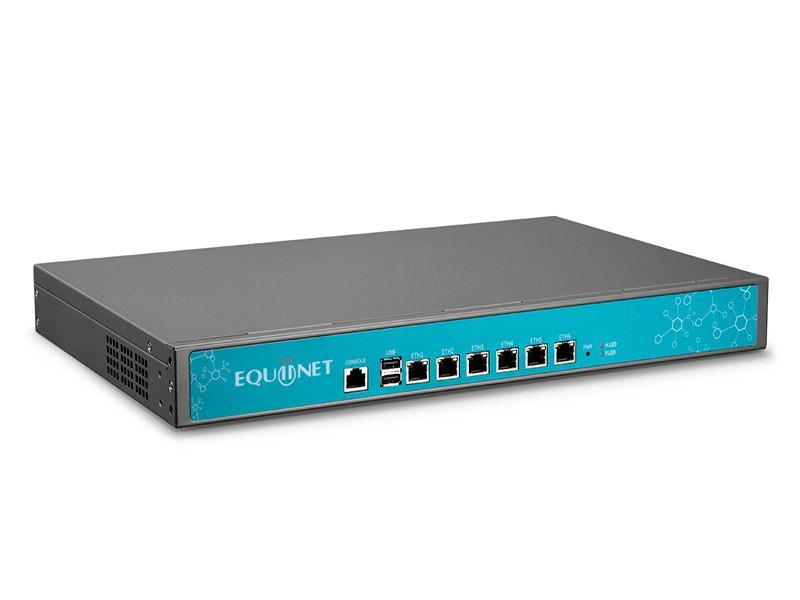


Large Enterprise IPPBX (<20,000 )
Large Enterprise IP Phone System — SINA 1000 Plus (<1000 Users)
$100.00
+ Shipping FeeSystem Features Highlights
- Support 1000 users, easy to scale up.
- Support virtual machine/cloud deployment, making later maintenance convenient.
- Support high availability & cluster deployment, ensure high stability 99.999%.
- Support multi-party phone/video conference, make communication efficient.
- Support customization to meet different customer needs.
- Rich features with affordable price.
Related products
-
Large Enterprise IPPBX (<20,000 )
Large Enterprise IP Phone System — SINA 5000 Plus (<5000 Users)
$100.00 -
Large Enterprise IPPBX (<20,000 )
Large Enterprise IP Phone System — SINA 10000 Plus (<10000 Users)
$100.00 -
Large Enterprise IPPBX (<20,000 )
Large Enterprise IP Phone System — SINA 2000 Plus (<2000 Users)
$100.00


Reviews
There are no reviews yet.